

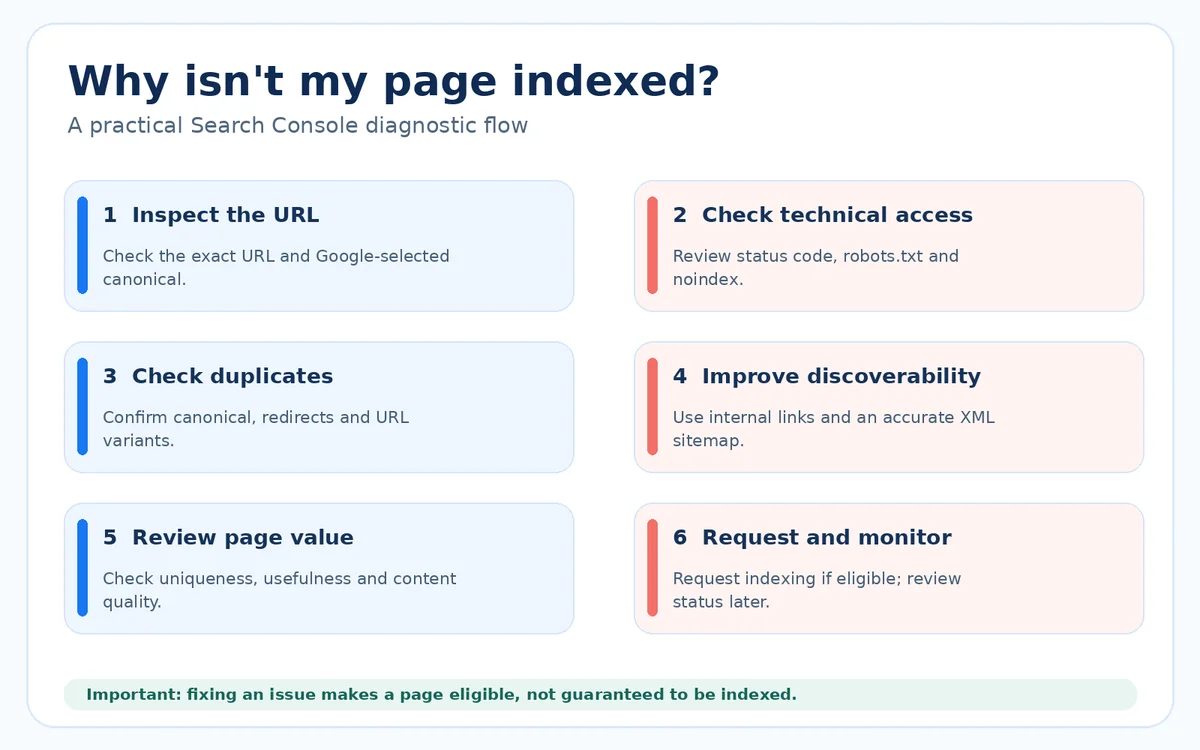
Most Search Console indexing issues become easier to solve when you first ask whether a page should be indexed at all. In Google Search Console, open the Page indexing report, identify the reason a URL is excluded, and inspect a specific example with URL Inspection. Fix technical barriers such as an accidental noindex directive, unwanted redirects or broken canonical signals. Then improve discovery and content where necessary. Requesting indexing can help Google recrawl a page, but it never guarantees that the page will appear in search results.
Understand crawling, indexing and ranking
Crawling means Googlebot discovers and fetches a page. Indexing means Google’s systems have processed a canonical version for possible inclusion in search. Ranking is a separate decision about whether that content is useful for a particular search. A page can be crawlable but not indexed, or indexed without receiving meaningful traffic.
Search Console reports do not mean every excluded URL is a problem. Duplicate, redirected, intentionally noindexed and parameter-based URLs may be correctly excluded. The aim is to have valuable canonical pages indexed, not to turn every URL green.
Start with a list of business-important pages: service pages, category pages, useful articles and key local landing pages. Separate those from filters, search results, staging pages and duplicates. This simple distinction prevents wasted troubleshooting.
Find the right report and inspect a page
Open the correct Search Console property and go to Indexing, then Pages. Review the chart and the reasons listed under ‘Why pages aren’t indexed’. Click a reason to see example URLs. The report may lag behind live changes, so do not interpret one status without checking an affected page.
Use URL Inspection for the exact canonical URL you want indexed. Review Google’s indexed information and run the live test where appropriate. Check whether the page is accessible, whether Google can fetch it, the user-declared canonical and Google’s selected canonical. These details often reveal a more specific problem than the broad report category.
Inspect a representative sample rather than assuming every affected URL has the same issue. On a large website, a category may include several causes. Keep a worksheet with URL, importance, current status, probable cause, assigned fix and date checked.
Fix accidental noindex, robots and response errors
A noindex directive tells search engines not to index the page. It may appear in a robots meta tag or X-Robots-Tag HTTP header. If an important public page is accidentally noindexed, remove the directive and check the live URL. Do not confuse noindex with robots.txt blocking: robots.txt controls crawling access and is not a reliable way to remove a URL from search results.
Check HTTP status codes. A deleted page that correctly returns 404 or 410 may not need fixing. A valuable page returning 404, an unexpected redirect loop or a server error does. Repair internal links and ensure the final destination loads successfully for visitors and crawlers.
Verify that staging protections, password walls and security rules are not unintentionally blocking Googlebot. Fix the underlying response before repeatedly requesting indexing. A submission request cannot override a genuine technical barrier.
Handle canonical and duplicate-page signals
A canonical URL is the preferred version among substantially similar pages. Ecommerce filters, tracking parameters, trailing-slash variations and multiple paths to one article can create duplicate URLs. Google may select a different canonical from the one declared on the page. That is not always an error.
Use consistent internal links, redirects where appropriate, self-referencing canonical tags on preferred pages and clean XML sitemaps. Avoid putting noncanonical variants in sitemaps or linking inconsistently to duplicates. Check whether meaningful pages have been accidentally canonicalised to the homepage or another unrelated URL.
If multiple pages target nearly the same user intent, consider consolidating or differentiating them rather than trying to force every version into the index. Technical changes alone cannot make near-identical content independently useful.
Understand discovered and crawled but not indexed
‘Discovered – currently not indexed’ generally indicates Google knows the URL but has not yet crawled it. Investigate whether the URL is reachable through internal links, included in a clean sitemap and important enough to justify prioritisation. Large or technically weak sites may have deeper discovery problems.
‘Crawled – currently not indexed’ means Google fetched the page but has not indexed it. Check for thin, duplicated, outdated or low-value content, canonical confusion and rendering issues. Some useful pages take time to be processed; the status by itself does not identify one guaranteed fix.
Do not respond by adding hundreds of words merely to meet a target. Improve the page’s ability to satisfy a clear search need, show original expertise, provide helpful structure and connect it to relevant pages. Review the live content as a visitor would.
Use internal linking, sitemaps and requests correctly
Important pages should be discoverable through normal crawlable links from relevant parts of your website. A page linked only from a JavaScript interaction or buried in an old campaign may be difficult to find. Use descriptive anchors and a logical information architecture.
Submit an XML sitemap containing canonical, indexable URLs. Keep it updated after meaningful page changes. For a small number of new or corrected pages, URL Inspection allows a request to index. Google states that such requests do not guarantee indexing or speed up repeated submissions of unchanged URLs.
Prioritise quality and correct signals over submission volume. If a service page remains excluded, investigate why Google may consider another URL canonical or the content insufficiently distinct. Monitor after changes rather than submitting the same page daily.
A weekly workflow for small business sites
Set aside time to review changes in the Page indexing report, focusing on priority pages and new error patterns. Compare the current state with previous checks. A sudden spike in excluded URLs after a redesign may indicate unintended sitewide settings, while a handful of known duplicates may require no action.
Maintain a simple troubleshooting register with issue, impact, fix, owner and verification date. After a technical change, test the live URL, update affected internal links if needed and revisit Search Console when fresh crawl data becomes available. Results will not always appear immediately.
For businesses without a technical SEO team, BlinkWorx digital marketing support can help separate genuine indexing defects from normal exclusions, then prioritise fixes that affect important pages and search visibility.
Explore related services: SEO services at BlinkWorx
Indexing troubleshooting also requires an understanding of site history. A recent website migration may have changed redirects, URL patterns, canonical tags and internal links at once. A new blog may simply need more time and stronger linking. Treat these situations differently instead of applying the same request-indexing routine to every URL.
For JavaScript-heavy sites, inspect the rendered content and verify that important text and links are visible to crawlers. Ensure navigation uses proper links and the main content is not dependent on an interaction Google cannot easily perform. Review mobile output because Google predominantly uses the mobile version for indexing.
After fixing an issue, keep evidence: screenshots of the original status, live-test output, deployment date and a later check of Google’s indexed state. Search Console status and search appearance can change independently. A reproducible record makes it easier to determine which fixes worked, which were unnecessary and which need further investigation.
Frequently asked questions
Why is my page crawled but not indexed?
Google has fetched the URL but has not included it in the index. Possible factors include duplication, weak page value, canonical selection or processing delays. Inspect the URL, compare similar pages and review content usefulness. There is no single button that guarantees a fix.
Does requesting indexing guarantee a Google ranking?
No. A request asks Google to consider recrawling a URL. It neither guarantees that the page will be indexed nor that it will rank for a particular keyword. Correct technical signals, useful content and internal discovery remain important. Repeated requests for unchanged pages do not speed up indexing.
Should every URL on my website be indexed?
No. Duplicate variants, redirects, internal search pages and intentionally excluded URLs often should not be indexed. Focus on the preferred canonical version of pages that serve a useful search purpose. Search Console may label intentional exclusions as not indexed without indicating a problem.
What is the difference between noindex and robots.txt?
A noindex directive asks search engines not to index a page that they can crawl and inspect. Robots.txt controls crawling access, not guaranteed removal from the index. If a page is blocked from crawling, Google may not see its noindex directive. Choose the correct mechanism for your goal.
How soon will Google index a fixed page?
Timing varies. Some pages are processed quickly, while others take days or weeks and some are never included. Check that the live page is accessible and important links point to it, then monitor Search Console. Avoid promising a deadline based solely on a successful indexing request.
Key takeaways
- Not every excluded URL is an SEO issue.
- Inspect the live URL and understand the reason before applying a fix.
- Correct canonical, noindex, response and linking signals first.
- An indexing request is not a guarantee of inclusion or ranking.
Keeping your pages indexed
Most Search Console indexing issues have an ordinary cause: a stray noindex tag, a conflicting canonical, a redirect chain or a page Google does not yet see as useful. Inspect the URL, read the reason Google gives, and fix that signal before requesting indexing. A short weekly look at the Page indexing report stops small problems from building up.
Contact BlinkWorx for a free consultation about SEO and digital marketing services. You can also message us on WhatsApp or contact our team.
Further reading: Google: Page indexing report, Google: URL Inspection tool.